
Best Free Email Finder Tools (2026): 8 Compared
The best free email finder for most small teams is Snov.io: its free Trial plan gives 50 credits a month with no end date, and paid plans start at $39/month with verification and cold email built in. Choose Hunter for company domain search, Apollo.io for a large contact database, or GetProspect for 50 free valid emails a month.
By Nelson Breitenberg · Last updated November 6, 2026 · All prices checked on each vendor’s pricing page on November 6, 2026
Disclosure: Some links on this page are affiliate links. If you buy through them, yourtechchoices.com may earn a commission at no extra cost to you. This never changes our recommendations.
How this list was made: We compared each tool’s own pricing page, help center and product pages, all checked on November 6, 2026. We have not run a hands-on accuracy test, so we report what each vendor states and label marketing claims as theirs. Read how we review.
Which email finder tools are worth trying for free?
Eight picks are worth a look: seven account-based tools with a free monthly or signup allowance and paid plans when you outgrow it, plus a pair of no-signup web tools (Mailmeteor and EXPERTE) for single lookups.
| Tool | Free tier (vendor-stated) | Entry paid plan | Best for | Key limit |
|---|---|---|---|---|
| Snov.io | 50 credits/month, no end date | $39/mo or $29.25/mo billed annually (1,000 credits) | Finding, verifying and emailing leads in one tool | No export on the free Trial plan |
| Hunter | 50 credits/month | $49/mo or $34/mo billed annually (2,000 credits/mo) | Company domain search and Google Sheets lookups | Credits don’t roll over |
| Apollo.io | 75 credits per seat/month | $65/seat/mo or $49/seat/mo billed annually | Searching a large B2B database by job title and filters | Priced per seat; credits don’t roll over |
| GetProspect | 50 valid emails/month | $49/mo or $34/mo billed annually (1,000 valid emails/mo) | A free allowance you only spend on valid emails | Free plan credits don’t roll over |
| Skrapp.io | 50 credits, 1 user | $39/mo or $29/mo billed annually (2,000 credits/mo) | Finding emails from LinkedIn and Sales Navigator | Paid plans cap users (2 on Professional) |
| Tomba | 25 searches/month | $49/mo or $37/mo billed annually (2,500 searches + 2,500 verifications) | Separate search and verification allowances | Free domain search shows 10 results |
| VoilaNorbert | 50 credits once, at signup | $49/mo or $39/mo billed annually (up to 1,000 leads/mo) | Simple name + domain lookups | Free credits don’t renew |
| Mailmeteor / EXPERTE | Free single lookups, no signup | Not applicable for the free finders | One-off lookups without an account | No bulk lookups or saved lists |
Prices in USD, checked on each vendor’s pricing page on November 6, 2026. A “credit” means different things in each tool, so compare what a credit buys, not just the count.
How did we choose these email finders?
We started from what ranks and gets cited for “free email finder” today, then kept the tools that a small business could realistically use. Every tool on the list had to meet four criteria:
- A real free option you can use before paying, stated on the vendor’s own site.
- Public pricing on the vendor’s pricing page, so you can check our numbers.
- Lookup by name and company (the core job), plus at least one of: domain search, a browser extension or bulk lookups.
- A clear rule for what costs a credit, such as no charge for emails that aren’t found.
We ranked tools on fit for small teams: the size and renewal of the free allowance, the cost of the first paid plan, what’s included (verification, export, outreach) and the limits that tend to catch people out. We did not rank on accuracy, because we haven’t tested it ourselves, and vendor accuracy claims aren’t comparable with each other.
What are the best free email finder tools?
Here’s each tool in order, with who it suits, what it costs and where it falls short. Every price below was checked on the vendor’s pricing page on November 6, 2026.
1. Snov.io: best all-in-one free email finder for small teams
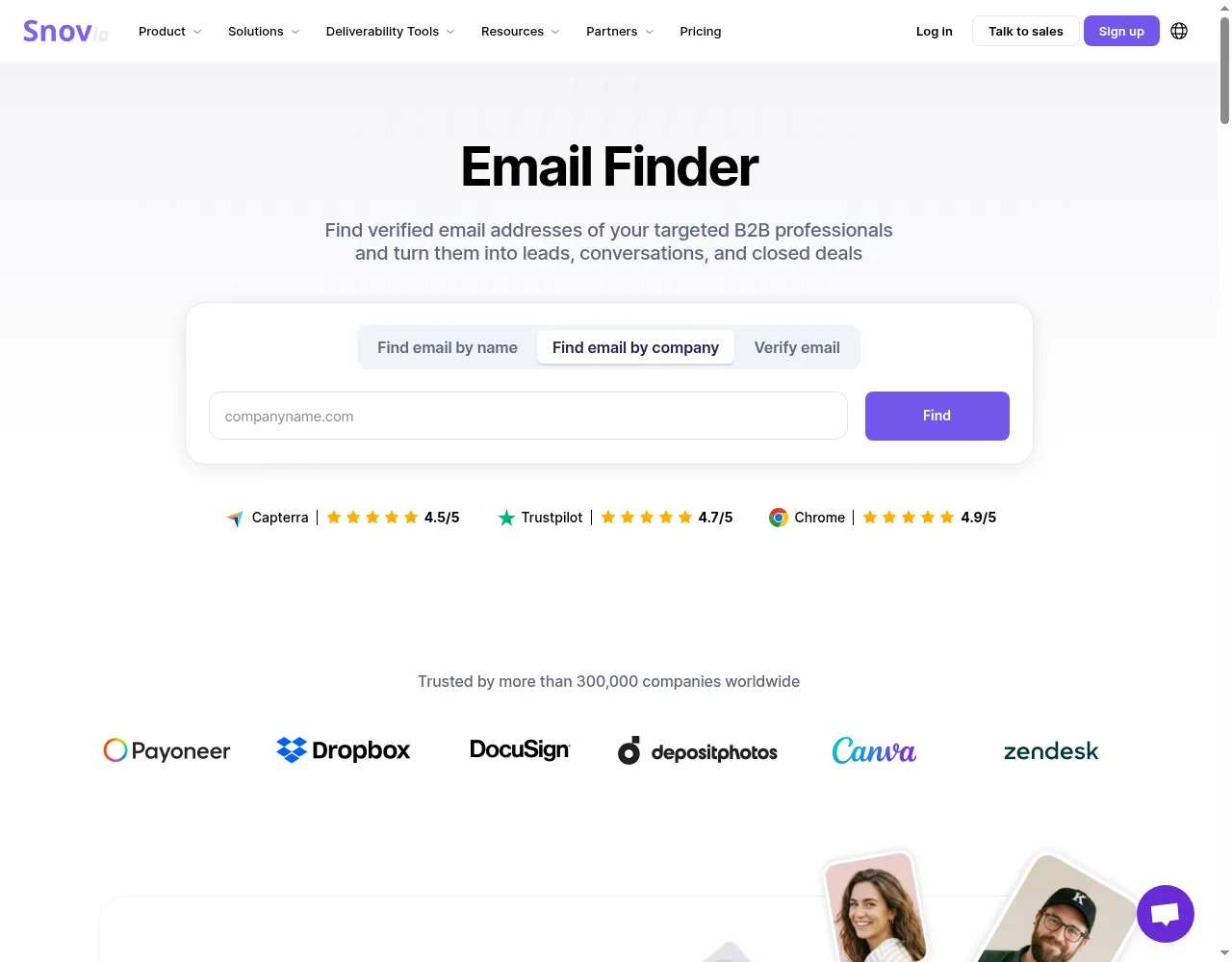
Snov.io is an all-in-one outbound platform: prospect database search, an email finder, an email verifier, enrichment, email warm-up and email + LinkedIn campaigns in one account. Snov.io says “over 300,000 businesses” use it.
Best for: founders, small sales teams and agencies that want to find emails and then email those people from the same tool.
Free tier: the Trial plan has no end date and includes 50 credits, 100 recipients, 25 enrichment tokens and 1 warm-up slot. Snov.io’s help center says the 50 credits reset each month, while the 25 tokens are a one-time allowance that doesn’t renew. One credit covers one email search, one saved prospect or one verification.
Paid pricing (vendor-stated):
- Starter: $39/month, or $29.25/month billed annually, with 1,000 credits and 5,000 recipients.
- Pro: from $99/month, or $74.25/month billed annually, with 5,000 credits. Larger Pro tiers lower the cost per credit; Snov.io’s FAQ puts Starter at about 3.9¢ per credit and Pro M at about 0.9¢.
- Unused credits roll over on monthly plans while the plan stays active.
Pros:
- Finding, verification, warm-up and sending in one subscription, with no per-seat fees.
- 7-tier verification; Snov.io says it is “98%+” accurate (vendor claim, not tested by us).
- Chrome extensions for websites and LinkedIn.
Cons:
- The free Trial plan doesn’t allow export, bulk search, bulk verification or integrations, and database search shows only the first 20 prospects.
- Starter’s 1,000 credits cost more per credit than Hunter’s or Skrapp.io’s entry plans.
- Snov.io’s billing FAQ says it doesn’t refund monthly or annual plan payments.
Verdict: the best pick if you will email the people you find. If you only need addresses, a finder-only tool is cheaper per lookup. Read our Snov.io review and the Snov.io pricing breakdown before you upgrade, or start on Snov.io’s free Trial plan.
2. Hunter: best for company domain search
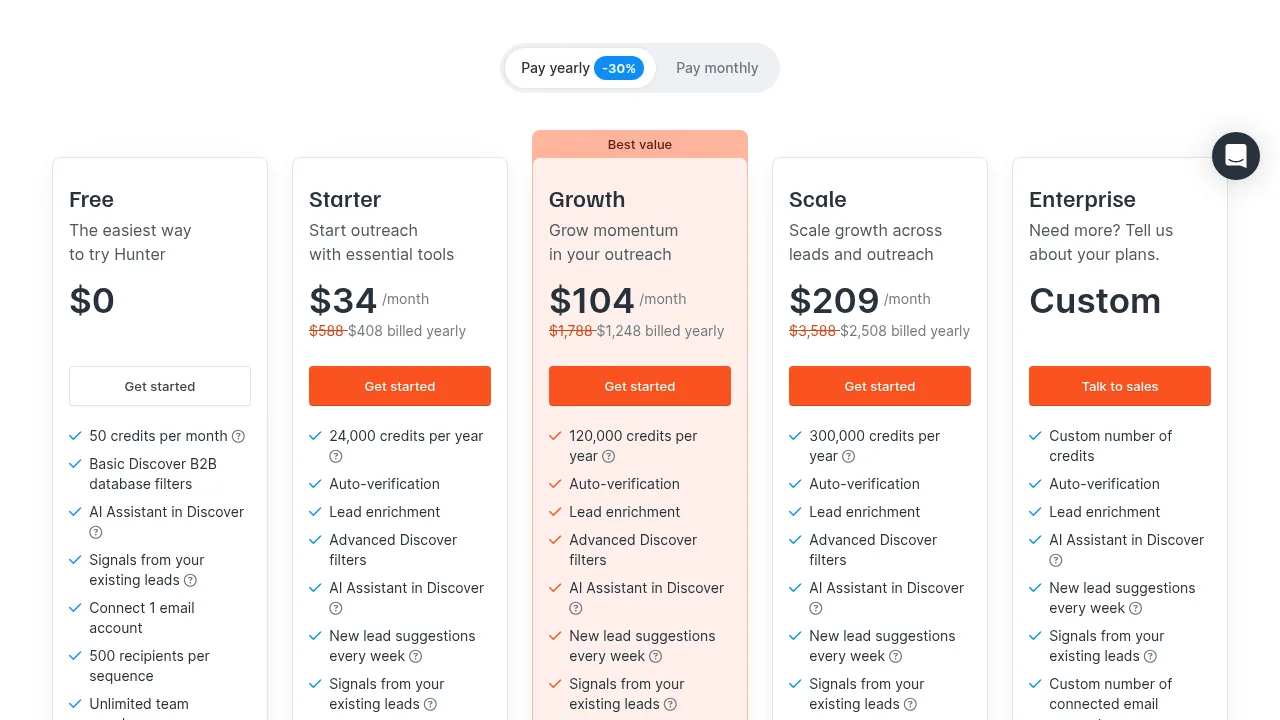
Hunter is an email finder and outreach platform best known for Domain Search, which lists the email addresses it has found for a company.
Best for: finding the right person at a known company, and teams that work in Google Sheets.
Free tier: 50 credits per month, 1 connected email account, 500 recipients per sequence and unlimited team members.
Paid pricing (vendor-stated):
- Starter: $49/month, or $34/month billed annually, with 2,000 credits a month.
- Growth: $149/month, or $104/month billed annually, with 10,000 credits a month.
- One credit = one email found; one verification costs 0.5 credit. Hunter says a search that finds nothing is free and repeat searches count once per billing period.
Pros:
- Unlimited users on every plan, including Free.
- Browser extensions, a Google Sheets add-on, an API and CRM integrations.
- Clear credit rules, published on the pricing page.
Cons:
- Monthly credits reset and don’t roll over.
- Sequences cap connected email accounts (1 on Free, 3 on Starter).
Verdict: the strongest single-purpose finder for researching a company. Hunter says more than 7 million professionals use it.
3. Apollo.io: best free database for prospecting by job title
Apollo.io is a sales platform built around a large B2B contact database, with sequences, a dialer and CRM tools on top.
Best for: building a list from filters (job title, industry, company size) rather than finding one known person.
Free tier: 75 credits per seat per month. Apollo.io’s help center says revealing a verified email costs 1 credit per net-new contact, and searching and filtering cost nothing. Free plans connect Gmail accounts only and include 2 sequences.
Paid pricing (vendor-stated):
- Basic: $65 per seat/month (2,500 credits per seat per month), or $49 per seat/month billed annually (30,000 credits per seat per year).
- Professional: $99 per seat/month (4,000 credits per seat per month), or $79 per seat/month billed annually (48,000 credits per seat per year).
- Credits don’t roll over, and Apollo.io says it doesn’t refund unused time when you downgrade.
Pros:
- The most generous free credit count on this list.
- Search and filter the database without spending credits.
- Free email campaigns are included.
Cons:
- Per-seat pricing gets expensive for teams.
- Annual plans can’t be switched to monthly mid-term.
Verdict: a strong free option for list building. Compare it with Snov.io in our Snov.io alternatives guide.
4. GetProspect: best free allowance for valid emails only
GetProspect is an email finder with a B2B database, a LinkedIn extension and bulk lookups.
Best for: low-volume prospecting where you only want to spend credits on valid addresses.
Free tier: 50 valid emails a month, plus a one-time $1 wallet balance to try phone numbers and verifications. GetProspect says not-found, invalid and unverifiable catch-all results are free.
Paid pricing (vendor-stated):
- Starter: $49/month for 1,000 valid emails a month, or $34/month on a yearly plan ($412 billed yearly).
- Growth 5k: $99/month for 5,000 valid emails a month.
- Phone numbers cost $0.12 each and verifications $0.80 per 1,000 from a shared wallet.
Pros:
- Unlimited teammates and API access on every plan, Free included.
- Unused credits on monthly paid plans carry over for one period.
Cons:
- Joint-highest entry cost per email on this list ($49 for 1,000, the same as VoilaNorbert).
- Free and yearly plans don’t roll credits over.
Verdict: the simplest free allowance to understand. Good for founders who need a few dozen verified emails a month.
5. Skrapp.io: best for LinkedIn and Sales Navigator
Skrapp.io is an email finder built around a browser extension for LinkedIn, Sales Navigator and company websites.
Best for: sellers and recruiters who prospect inside LinkedIn.
Free tier: 50 credits and 1 user. Skrapp.io’s help center says free accounts get 50 email credits each month; the pricing page doesn’t say whether they renew.
Paid pricing (vendor-stated):
- Professional: $39/month, or $29/month billed annually, for 2,000 credits a month and 2 users.
- Enterprise: $349/month, or $262/month billed annually, for 50,000 credits a month and 15 users.
- Skrapp.io charges only for emails marked Valid or Catch-all, and paid credits roll over.
Pros:
- The lowest entry price per credit on this list ($39 for 2,000).
- List saving and CRM sync from Sales Navigator on paid plans.
Cons:
- Seat caps: extra users need a custom deal.
- No refunds for partial months, per the pricing FAQ.
Verdict: the budget pick if you live in LinkedIn.
6. Tomba: best for separate search and verification allowances
Tomba is an email finder with domain search, an email verifier, phone lookups and an API.
Best for: teams that want to find and verify the same list without the two jobs eating one balance.
Free tier: 25 search credits a month. Free domain search shows up to 10 results.
Paid pricing (vendor-stated):
- Basic: $49/month, or $37/month billed yearly, with 2,500 searches and 2,500 verifications a month.
- Growth: $89/month, or $67/month billed yearly, with 5,000 of each.
- Searches that find nothing are free; unused plan credits don’t carry over.
Pros:
- Verification has its own allowance, so checking emails doesn’t use search credits.
- Credit packs (valid 365 days) if you don’t want a subscription.
Cons:
- The smallest free allowance of the seven.
- Refunds only within 72 hours and under a usage threshold.
Verdict: good value per lookup on paid plans. Tomba publishes a 5,000-lead benchmark it ran itself, in which it ranks first; treat any vendor-run test as marketing.
7. VoilaNorbert: best for simple one-off lookups
VoilaNorbert is a straightforward name + domain email finder with bulk upload, verification and enrichment.
Best for: occasional lookups by people who don’t want a big platform.
Free tier: 50 free credits when you create an account. They are a one-time allowance, not monthly.
Paid pricing (vendor-stated):
- Valet: $49/month, or $39/month billed yearly, for up to 1,000 leads a month.
- Butler: $99/month, or $79/month billed yearly, for up to 5,000 leads a month.
- Pay-as-you-go verification at $0.003 per email (up to 500,000).
Pros:
- Unlimited team members, bulk and API use on every paid plan, and credit rollover.
- VoilaNorbert says it only counts successful finds.
Cons:
- Free credits don’t renew.
- CRM connections go through Zapier, per its FAQ.
Verdict: fine for occasional use. Pick a monthly free tier above if you need a few lookups every month.
8. Mailmeteor and EXPERTE: best no-signup free email finders
Mailmeteor’s Email Finder and EXPERTE’s Email Finder are free web tools: type a name and a company domain, and they test likely address patterns against the company’s mail server.
Best for: finding one or two addresses right now, without creating an account.
Free tier: free single lookups with no signup. Mailmeteor says fair-use limits apply to stop automated scraping. Both say they don’t store your searches.
Pros: nothing to install and no account.
Cons: single lookups only, no saved lists, and catch-all domains return “Risky” or “Unknown” results. Mailmeteor’s “97%+ accuracy” figure is its own claim.
Verdict: use them for a quick one-off. For anything repeatable, use one of the seven tools above.
How do the free tiers and paid prices compare?
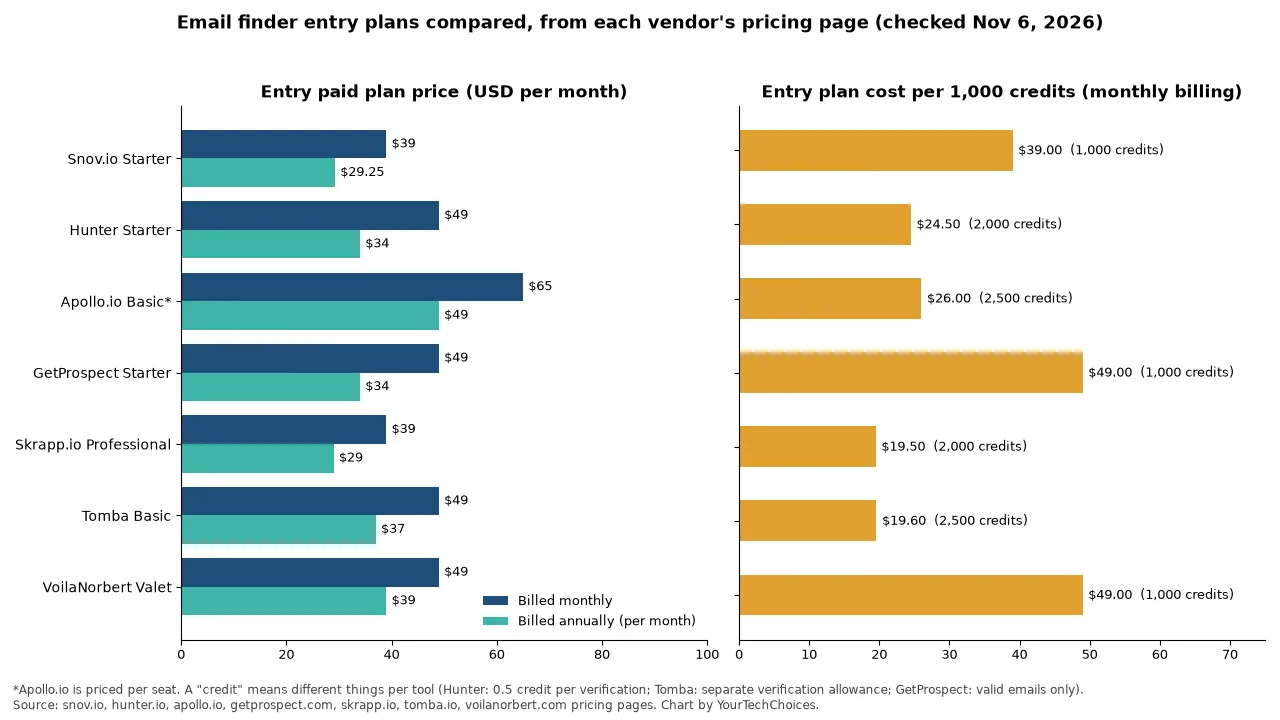
The free tiers are close in size: most give about 50 lookups. The real differences are what a credit buys, whether it renews, and the cost per lookup once you pay.
- Monthly free allowance: Apollo.io (75 credits per seat), Snov.io, Hunter, GetProspect and Skrapp.io (50 each), Tomba (25 searches).
- One-time free credits: VoilaNorbert (50 at signup).
- Lowest entry price per 1,000 credits (monthly billing): Skrapp.io ($19.50) and Tomba ($19.60), then Hunter ($24.50) and Apollo.io ($26 per seat). Snov.io Starter is $39, and GetProspect and VoilaNorbert are $49.
- Annual billing cuts entry prices by roughly 20 to 30%.
How do you choose the right email finder?
Start from the job, not the free credit count. Use these five questions:
- Will you email the people you find? If yes, an all-in-one tool like Snov.io or Hunter saves you a second subscription. If not, a finder-only tool is cheaper.
- Where do you prospect? LinkedIn: Skrapp.io or Snov.io’s extension. Company websites: Hunter’s Domain Search. Database filters: Apollo.io.
- How many lookups a month? Under 50, stay on a free plan. A few hundred to a thousand, compare entry plans. Thousands, compare cost per credit on mid-tier plans.
- How many people need access? Apollo.io charges per seat and Skrapp.io caps users; Hunter, GetProspect and VoilaNorbert include unlimited team members, and Snov.io has no per-seat fees.
- Do unused credits roll over? Snov.io (monthly plans), Skrapp.io and VoilaNorbert say yes, and GetProspect carries monthly-plan credits over for one period; Hunter, Apollo.io and Tomba say no.
Whatever you pick, verify addresses before a campaign and follow the rules where you send: CAN-SPAM in the US, and GDPR or CASL where they apply. For the next step, see our guide to sales prospecting and cold email tools.
Frequently asked questions
What is the best free email finder?
For most small teams, Snov.io’s free Trial plan is the best free email finder because it includes 50 credits a month plus verification and email sending in one account. Apollo.io gives the most free credits (75 per seat a month), and GetProspect charges its 50 free monthly credits only for valid emails.
Is there a free unlimited email finder?
No. Every email finder on this list limits free use. Most account-based tools give 25 to 75 lookups a month, and no-signup tools like Mailmeteor and EXPERTE apply fair-use limits. Several tools don’t charge a credit when no email is found, which stretches a free allowance.
Is there a free email finder with no signup?
Yes. Mailmeteor’s Email Finder and EXPERTE’s Email Finder let you look up one address at a time without an account. They suit one-off searches. For lists, saved leads or bulk lookups, you need an account with a tool like Snov.io, Hunter or GetProspect.
How do email finder tools work?
Email finders combine a database of addresses found on public web pages with pattern guessing (for example first.last@company.com) and a check against the company’s mail server. They then label each result valid, risky or unknown. Catch-all domains accept any address, so finders can’t fully confirm them.
Are email finder tools accurate?
Accuracy varies by tool, company and how recently the data was collected. Vendors publish their own figures, such as Snov.io’s “98%+” verification claim and Mailmeteor’s “97%+”, but those aren’t independent tests. Verify every address before you send, because bounces hurt your sender reputation.
Is it legal to use an email finder?
Using an email finder is generally legal for business outreach. How you email matters: in the US, the FTC says CAN-SPAM covers all commercial email, including business-to-business messages. It requires accurate header information, honest subject lines, a clear statement that the message is an ad, your valid physical postal address and a working opt-out, and you must honor opt-outs within 10 business days. GDPR (EU and UK) and CASL (Canada) add rules. This is general information, not legal advice.
Can Apollo find emails?
Yes. Apollo.io finds business emails from its contact database. Its help center says revealing a verified email costs 1 credit per net-new contact, and the free plan includes 75 credits per seat each month (checked November 6, 2026).
About the author
Nelson Breitenberg
Nelson Breitenberg is a marketing and business-software executive based in Utah. He has served as CMO at multiple software companies and has led the integration of business software into large organizations.
Sources and check dates for every fact on this page are listed in the page’s source notes. Prices change often; re-check each vendor’s pricing page before buying.